
Checking a sketch
What you’ll do: find and fix the small gaps that stop an outline from closing, so it can be filled, hatched or measured.
Time: about 5 minutes.
Why outlines don’t close
A fill needs a closed area. An outline that looks closed may not be: two ends a fraction of a millimetre apart, a line that stops just short of another, or a line of no length left over from an edit. These are common in imported DXF files.
1. Open the checker
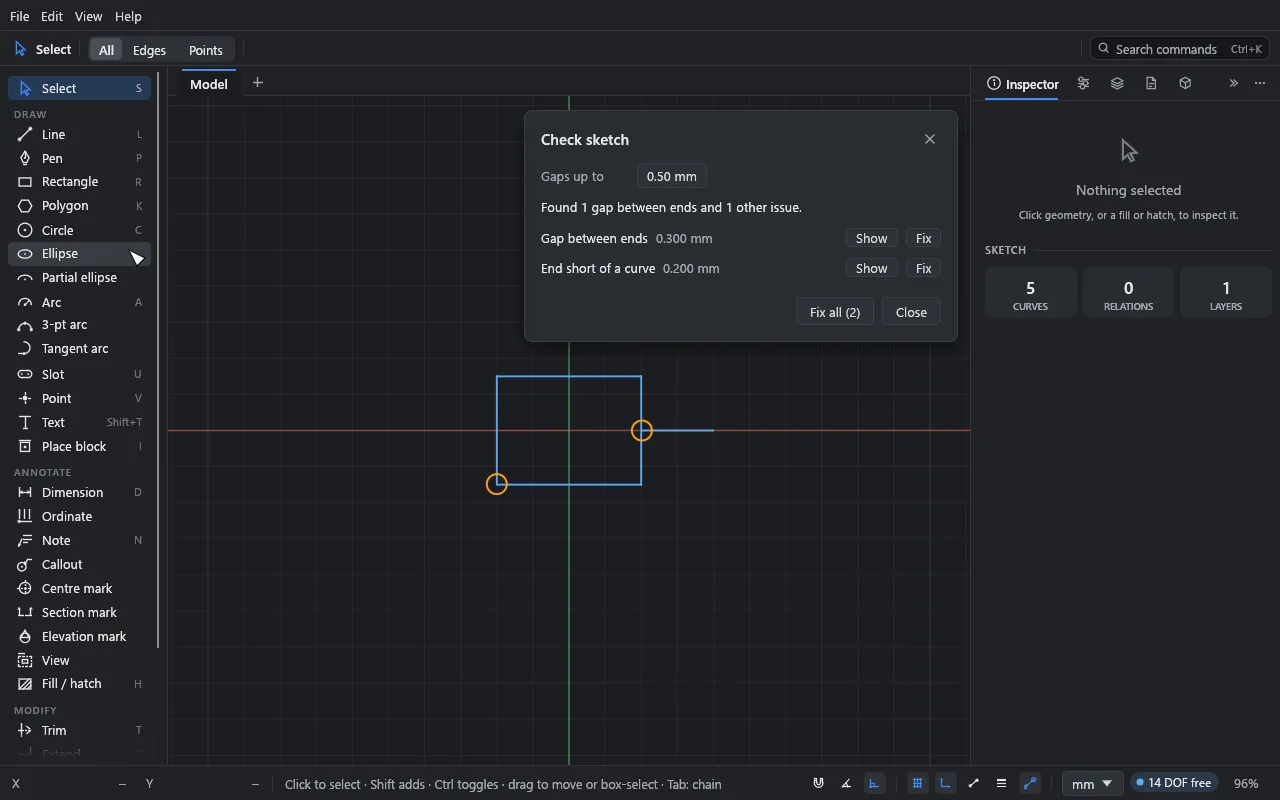
Choose Edit → Check sketch… (or find “Check sketch” in the command palette, Ctrl+K). The DXF import report has a Check sketch… button too.
The window lists every issue it finds, and each is ringed on the canvas while the window is open:
- Gap between ends: two open ends closer than the tolerance.
- End short of a curve: an open end that stops just short of (or just past) another curve.
- Curve of no length: a line or arc whose ends are in the same place.
An open end is the end of a solid curve that nothing else uses or holds. Construction and locked geometry are left out.
2. Set the tolerance
Gaps up to sets how far apart ends can be and still count as meant to meet. It’s 0.5 mm to start with, and Drift remembers what you set. Ends further apart are left alone.
3. Fix
- Show picks the issue and zooms to it.
- Fix fixes one:
- A gap’s two ends are joined into one point. The end held by more relations and dimensions stays where it is.
- A short end gets an On curve relation to the curve, which stays where it is.
- A curve of no length is removed and its ends joined.
- Fix all fixes everything, as one undo step. Any fix that would break the sketch (a relation or dimension that can’t then hold) is skipped, and Drift reports what it left.
What the checker doesn’t do
It doesn’t extend lines that stop well short of where they should meet. Use Extend (E) or Trim (T) for those.
Separately, the status bar warns when curves lie on top of each other (the same line drawn twice, for example). Click the N overlapping pill to pick the ones on top; Delete then removes them and leaves those underneath.
What you learned
- Edit → Check sketch… finds gaps, short ends and curves of no length.
- Fix all closes them in one undo step, keeping the sketch solvable.
Next
Look things up in the reference, or read Coming from another program.